Foreword
This is a short practical description of RSDF. For a thorough explanation please await my paper on the topic or get in touch to discuss.
What is RSDF?
RSDF is a method for rendering scalable vector-like graphics in real-time environments like videogames. It extends signed distance fields (SDFs) to support more than two colours by using multiple alternating SDF regions.
Creating RSDFs
To use the tool upload your SVG input, set the size of your output, change other settings as needed (the defaults should work fine), and click Convert. If the output has an undesirable scale or placement in the output please tweak the Placement settings. I recommend saving the outputs with the Save button as directly saving the canvases ignores transparent texels, and uses a less descriptive filename.
I will add that the converter is entirely local. No files are sent to my website, and your work remains private.
Using RSDFs
Using RSDFs will require the RSDF itself and an accompanying colour image. Import these into your program of choice, and pass them as input textures to a material or shader from this repository. Sampling functions have also been provided to mix RSDF into your own materials and shaders.
Note: if you are using Blender you must manually specify the size of your RSDF and colour textures inside the material.
How does it work?
RSDF itself draws inspiration from Viktor Chlumský’s Multi-Channel SDF (MSDF) method, wherein both use multiple SDFs to improve some aspect of the output image. MSDF uses multiple channels to create sharp discontinuities and corners — a notable flaw of native SDF. RSDF uses multiple channels to split the shape into different non-overlapping regions of continuous colour. By taking the minimum channel (or maximum in inverted mode) shaders can identify which region/s a pixel belongs to and perform partial sampling.
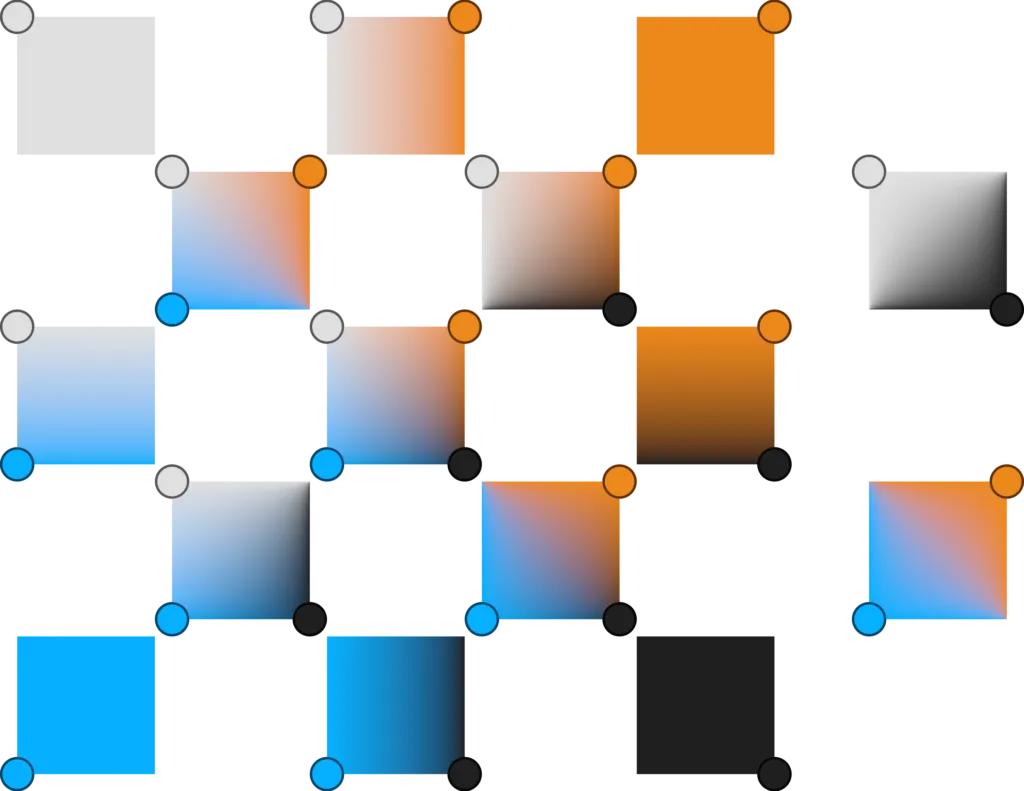
Partial sampling is very similar to regular pixel interpolation except that some texels are discarded and the mix is manually normalised. Discarding texels in other regions allows them to have completely different colours, meaning they can be stored in the same image without blurring. The following diagram shows an example space between four texels and the blends made by ignoring different texels:
Why SVG?
The accompanying tool has been built to take Scalable Vector Graphics (SVGs) as input since RSDFs aim to render vector-like graphics. SVGs reliable, precise, widely-supported, and well-defined, but I understand they are not often used in pipelines due to their difficulty. In the future I hope to extend this tool to take high resolution bitmap input, but this method will be less robust and effectively require a second back-end.
Are there limitations?
RSDF is theoretically capable of representing any arrangement of regions, as regions reduce to planar graphs subject to the four colour theorem. There are practical limitations (alongside converter issues), however:
- Very low resolutions will struggle; Thin strips and narrow corners create
undefined colours when lacking nearby region texels, and small features cause
opposing edges to interfere within the SDFs.
- Since these issues only occur for features smaller than a texel, increasing the image size will fix it.
- Texels belonging to multiple regions reintroduce colour bleed. However,
this allows regions to border themselves.
- The converter has an option to mark bleed texels for manual correction. Simply change one of the offending RSDF texel’s channels by one in an image editor.
- Despite using multiple fields, RSDF corners are not as sharp as MSDF. While
there is minor three- and four-way intersection self-sharpening other corners
and edges are equal to plain SDFs.
- Consider if MSDF partial sampling is stylistically acceptable instead.
- While an MSDF for every channel fixes the issue it negates memory gains, complicates the pipeline, and adds tons of redundant data.